
Every extra second your website takes to load can push potential clients towards the back button. While Google does not automatically demote every slow site, loading speed directly shapes user experience and forms part of the broader page experience signals Google weighs alongside relevance and content quality.
For most business owners, the immediate concern is not just SEO, but lost revenue. If your business website takes too long to become usable, prospective customers may leave before they ever see your offer.
Why Page Speed Matters for Your Business
Website speed directly affects what happens after someone clicks through to your website.
A potential client might be searching for a local service, comparing product options, or trying to contact your team. If your page lags, images take too long to load or buttons feel unresponsive, that visitor may leave before taking the next step.
This conversion friction can affect businesses across different industries:
- Service Businesses: Visitors may leave before reaching your enquiry form or click-to-call button.
- Ecommerce: Slow product pages and delayed checkout processes can create unnecessary cart abandonment.
- Lead Generation: Slow landing pages can use up paid advertising spend without generating enquiries.
- Local Businesses: Australians browsing on variable 4G and 5G mobile networks may experience more friction on poorly optimised websites compared with users on high-speed office Wi-Fi.
Site speed is only one piece of the customer experience puzzle. While a lagging page causes visitors to leave, a site that crashes completely destroys user trust in an instant. If you’ve ever lost leads to unexpected technical downtime, explore our article on protecting your business reputation from website outages.
Does Page Speed Affect Google Rankings?
Yes, but not in the overly simplistic way, it is sometimes presented.
Google evaluates many signals when determining which pages appear in search results. Core Web Vitals form part of its page experience considerations, but Google has repeatedly clarified that good Core Web Vitals scores alone do not guarantee higher rankings.
Relevance, content quality and other ranking systems still matter, as set out in Google’s own guide to Search ranking systems.
That means improving page speed should not be treated as a shortcut to page one.
Instead, think of performance as part of a stronger SEO foundation. A website should provide useful information, satisfy search intent, work well on mobile devices and provide a smooth experience once visitors arrive, an approach we cover in more depth in our on-page SEO services.
What Are Core Web Vitals?
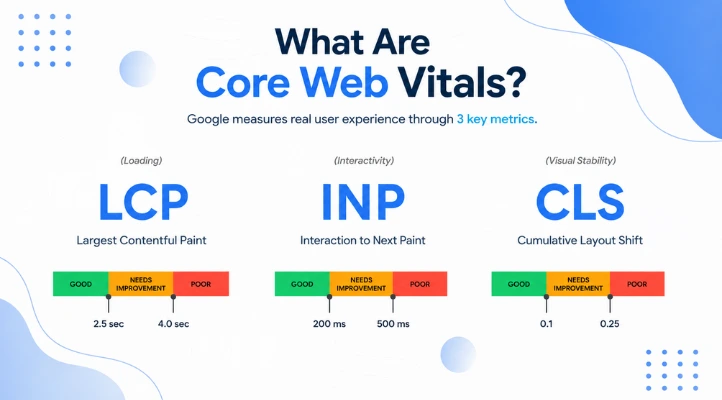
Google’s Core Web Vitals evaluate three distinct aspects of user experience:
- Largest Contentful Paint (LCP): Measures loading performance. Google considers 2.5 seconds or less a good resultfor the main content to load.
- Interaction to Next Paint (INP): Measures page responsiveness when users click, tap or interact with elements. A good INP score is 200 milliseconds or less.
- Cumulative Layout Shift (CLS): Measures visual stability. A target score of 0.1 or less helps ensure buttons, text and images do not unexpectedly move as the page loads.
These metrics are more useful than simply asking, how many seconds does my site take to load? A page can display text quickly but still frustrate users if layout shifts cause accidental clicks, or buttons take too long to respond to taps.
What Makes a Website Slow?
Poor loading performance is rarely caused by a single issue. Common causes include:
Large images or oversized images can add significant page weight, particularly large hero images and uncompressed product photography. Images should be appropriately sized and compressed without sacrificing necessary quality.
Too many scripts from analytics, chat tools, advertising platforms, tracking software, and other third-party scripts can increase the amount of work a browser needs to perform.
Poor hosting. A website can be well designed but still slow if its hosting environment cannot handle its traffic or configuration. This is a common issue we flag in our guide on what to know before using WordPress to build a website.
Unnecessary plugins and applications. WordPress plugins, ecommerce applications and other website functionality can add scripts and resources. Removing unnecessary components can improve performance.
Layout instability from images, videos and other elements without reserved dimensions can cause content to jump as a page loads, directly affecting visual stability.
How to Check Your Website Speed
Rather than testing only your homepage, evaluate the key pages that contribute to your business results:
- High-converting service pages
- Core location pages
- Bestselling product pages
- Paid campaign landing pages
- Contact, booking and checkout pages
You can run diagnostic tests for free using Google PageSpeed Insights to inspect individual URLs and Google Search Console’s Core Web Vitals report can also show Core Web Vitals information for groups of URLs based on real-world data.
Do not only test your homepage. Check the pages that generate business, including:
- Service pages
- Location pages
- Product pages
- Landing pages
- Contact and booking pages
- Checkout pages
A fast homepage does not necessarily mean the rest of your website performs well.
Practical Steps to Improve Your Website Performance
You do not always need a complete website to rebuild.
Start by identifying the biggest problems, then prioritise changes based on their likely impact.
This could include:
- Compressing and correctly sizing images
- Removing unnecessary scripts and plugins
- Improving caching and content delivery
- Reviewing hosting and server performance
- Reducing unnecessary page elements
- Reserving space for images and embedded content
- Testing mobile performance
- Re-testing after technical changes
The goal is not to chase a perfect PageSpeed score for its own sake. The goal is to make your website faster, more responsive, and easier for real customers to use.
How Rankaholics Can Help
At Rankaholics, we treat website performance as an integrated part of your broader SEO and digital growth strategy.
Instead of simply running an automated audit and telling you to fix your speed, our technical SEO and web development specialists look at how website performance connects with your search visibility, site architecture and customer conversion journey.
We assist Australian businesses with:
- Technical SEO and Core Web Vitals improvements
- Front-end asset and image optimisation
- Mobile usability and page experience improvements
- Custom website design and performance-focused web development
- Conversion rate optimisation (CRO)
A fast website with thin content will still struggle to perform, while exceptional content on a sluggish website can lose potential customers before they convert. The strongest growth strategies bring technical performance, high-value content, and user experience together.
Ready to Stop Losing Leads to Slow Load Times?
If your website feels sluggish or your conversion rates are not matching your search traffic, Rankaholics can audit your website and identify where performance bottlenecks may be costing your business.
Contact Rankaholics today for a free technical consultation.